
The DC Master can connect to digital outputs (e.g. magnetic locks, lights, motors) [see: Using a Digital Output channel] and Analog outputs (e.g. dimmable lights) [see: Using an Analog Output channel]
We recommend you watch the DC Master Tutorial.
To connect anything to a DC Master, you will need:
- Flathead screwdriver
- Wire strippers (if required)
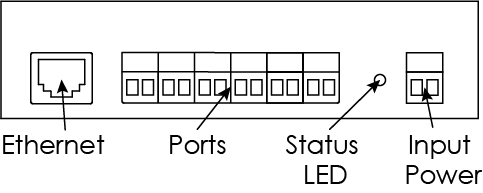
Digital Outputs / Analog Outputs
To connect any device to the DC Master, screw the stripped wires into each terminal block
- the wire order must go negative then positive
- The pairs must always go into adjacent terminal screw holes in pairs starting from the left
- The terminal blocks are removable
To patch this channel to a digital input in COGS software see Patching channels to the DC Master